The project layer for AI coding harnesses

Turn the coding harness you already use into an AI-native IDE.

Run Strata19 from a desktop app, IDE, CLI, or TUI. Your harness gives the agent tools; Strata19 gives it a project—durable code context, specifications, work, routines, approvals, checkpoints, and evidence.

  • Desktop, IDE, CLI, and TUI
  • Codex, Claude Code, and Antigravity available
  • No source upload required
send-document.ts — documenso
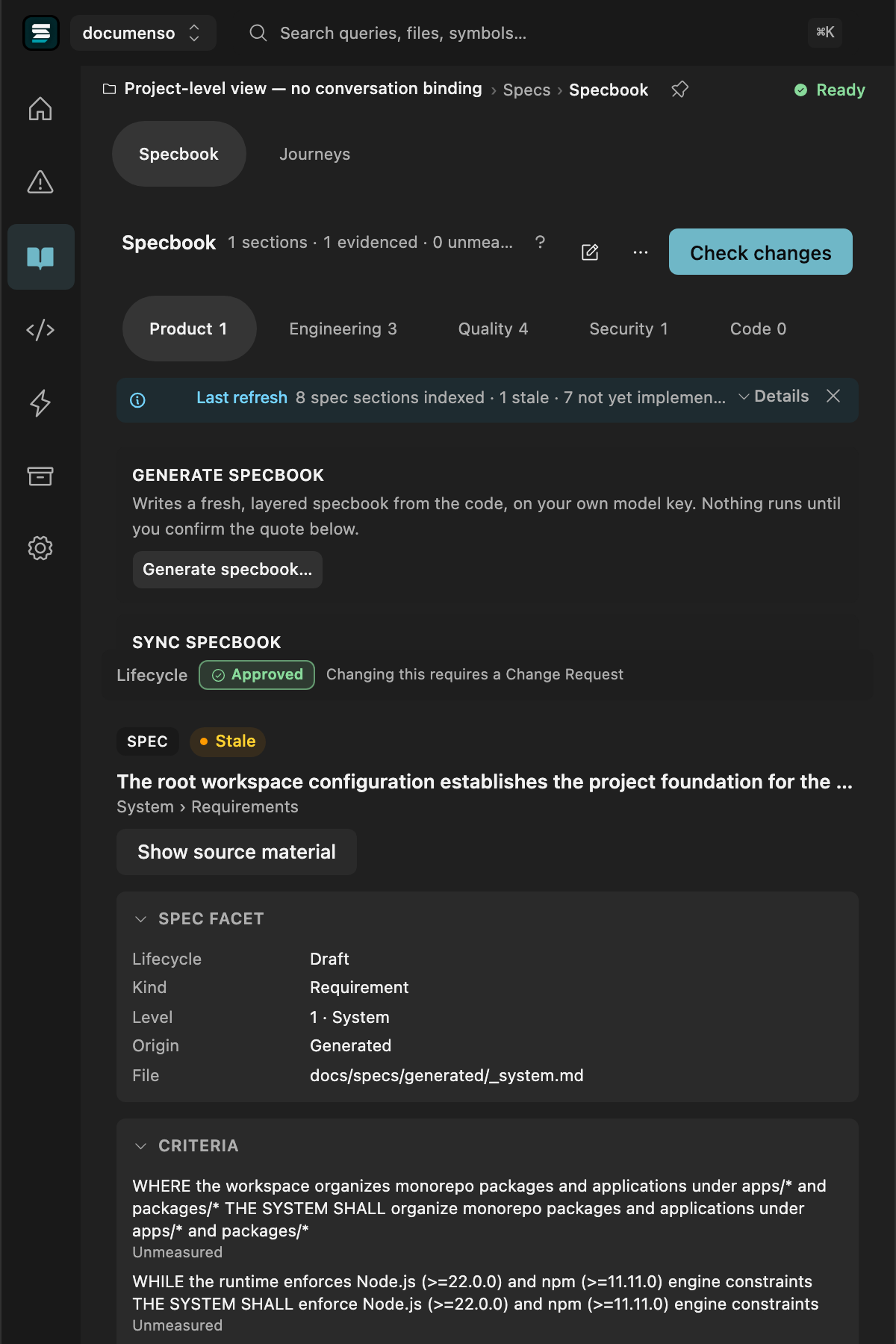
The Strata19 pane docked in a coding harness, showing a specbook section with EARS-shaped acceptance criteria linked to the code that implements them

The problem

Models can generate code. They still do not own the project they are changing.

A coding conversation can see files and follow instructions. It does not automatically inherit durable project state, accepted intent, work history, or evidence that the requested outcome was reached.

88–95%

of AI-built projects never reach real users

Aggregate across major AI app-building platforms, 25M+ users — not an edge case.

65%

say AI assistants miss relevant context when refactoring — Qodo, 2025

It doesn't know what it's building

Past a certain size, quality collapses — the agent can't hold your architecture, your conventions, or what changed five files away, so it guesses.

Closes with

A persistent map of the codebase that survives past any single context window — not rebuilt from scratch every session.

48%

of developers always check AI-generated code before committing it — Sonar, 2026

Nobody agreed on what "done" means

Without an explicit, checkable definition, an agent stops when the code compiles — not when it's actually correct. The gap surfaces later, usually in production.

Closes with

A definition of done that's checked deterministically — not asserted by the same model that wrote the code.

70–90%

of requirements never make it into a written spec

The code isn't the whole story

Decisions, constraints, and prior findings live outside the files. Past a few thousand lines, an agent reading only source code is reading half the project.

Closes with

A reference layer outside the code — specs, decisions, prior findings — that's actually queryable.

1.7x

more issues in AI-authored code than human-written code — CodeRabbit, 470 real PRs, 2025

Nothing checks the work

Mock data, stubs, and quietly duplicated logic all compile clean. Gaps like these don't show up until they've compounded into a much bigger one.

Closes with

Verification that runs after every change, independent of the agent's own claim that it's finished.

What shipping without these looks like

Mock dataStubs & placeholdersWrong implementationsDuplicate utilitiesSecurity gaps

Strata19 is built around exactly these four requirements.

The project environment

Give every coding agent the same project state — not another reconstruction of the last conversation.

AGENTS.md, CLAUDE.md, .cursorrules — however many you keep, they only ever carry instructions. Strata19 holds the evolving project once, on your machine: what exists, what is intended, what work is open, what changed, and what the available evidence supports. It exposes that state through one MCP tool surface while making host-specific limits explicit.

One portable MCP foundation

Orientation

Where am I, what’s next

Code intelligence

Symbols, routes, call paths

Impact analysis

What breaks if I touch this

Specs

What it should do, binding

Library

Research, decisions, and context

Findings

Real gaps, with file and line

Work

In flight, blocked, or done

Orchestration

Routines that run, pause, resume

Verification

Proof it landed, not a claim

Understand the code, understand the intent, and move the work without rebuilding the project from chat history.

your coding harness
the capability layer above
Project state — on your machineFREE
Strata19 Cloud — sync, team, heavy computePREMIUM

Real host evidence today. Cursor, Gemini CLI, Copilot, Windsurf, and other MCP templates remain planned.

Codex · availableClaude Code · availableAntigravity · availableOpenCode · beta

Code Intelligence

Your coding harness gives agents tools. Strata19 gives those tools project reality.

Import graphs and call graphs are only the start. Strata19 adds the project layer AI-generated code needs: relevant code relationships, detectors tuned to how agents fail, specifications, findings, and evidence with explicit limits. Where a detector is unmeasured, it says so.

Detectors

31 shipped checks

22 automatic checks and 9 on-request checks — all shipped in the plugin.

Finds source files that no import, route, test, or configuration entrypoint reaches.

Included in the plugin’s automatic verification paths.

Finds repeated code blocks across the project.

Included in the plugin’s automatic verification paths.

Finds unfinished code such as TODOs, empty bodies, and not-implemented errors.

Included in the plugin’s automatic verification paths.

Finds missing environment templates, malformed package files, and missing standard commands.

Included in the plugin’s automatic verification paths.

Finds catch handlers that silently discard failures instead of preserving or escalating them.

Included in the plugin’s automatic verification paths.

Finds an unprotected endpoint beside guarded endpoints under the same route prefix.

Included in the plugin’s automatic verification paths.

Finds when accepted project standards no longer match the configuration that established them.

Included in the plugin’s automatic verification paths.

Maps infrastructure files and reports recognized inputs the analyzer could not resolve.

Included in the plugin’s automatic verification paths.

Finds exported symbols that no other project source imports.

Included in the plugin’s automatic verification paths.

Finds files unreachable from the application entrypoints.

Included in the plugin’s automatic verification paths.

Finds background jobs and scheduled tasks that are defined but never registered.

Included in the plugin’s automatic verification paths.

Finds groups of modules that import each other in a cycle.

Included in the plugin’s automatic verification paths.

Finds branches and statements that cannot execute.

Included in the plugin’s automatic verification paths.

Finds function bodies that remain duplicates even after identifiers are renamed.

Included in the plugin’s automatic verification paths.

Finds routes registered to handler names that do not exist.

Included in the plugin’s automatic verification paths.

Finds a sensitive handler without the permission check used by its siblings.

Included in the plugin’s automatic verification paths.

Finds production source importing testing libraries.

Included in the plugin’s automatic verification paths.

Finds functions that appear complete but do no meaningful work.

Included in the plugin’s automatic verification paths.

Finds configuration that points to a missing script, file, or environment variable.

Included in the plugin’s automatic verification paths.

Finds specified endpoints or entities with no corresponding implementation.

Included in the plugin’s automatic verification paths.

Finds implemented entities or endpoints whose fields disagree with the specification.

Included in the plugin’s automatic verification paths.

Finds reachable routes missing from an already documented API namespace.

Included in the plugin’s automatic verification paths.

Traces request-controlled input into shell command execution.

Available through an explicit, named plugin request.

Ask the plugin to run: run_native_security_analysis

Traces request-controlled input into dynamically constructed database queries.

Available through an explicit, named plugin request.

Ask the plugin to run: run_native_security_analysis

Finds request-controlled URLs used for server fetches or redirects.

Available through an explicit, named plugin request.

Ask the plugin to run: run_native_security_analysis

Finds request-controlled filenames used as unrestricted filesystem paths.

Available through an explicit, named plugin request.

Ask the plugin to run: run_native_security_analysis

Finds unescaped request-controlled text written into HTTP responses.

Available through an explicit, named plugin request.

Ask the plugin to run: run_native_security_analysis

Finds request-controlled input passed into dynamic JavaScript execution.

Available through an explicit, named plugin request.

Ask the plugin to run: run_native_security_analysis

Compares revisions for removed or changed exports and names the affected callers.

Available through an explicit, named plugin request.

Ask the plugin to run: get_breaking_change_risk

Reports which checkable promises in a file are proven, disproven, or limited by verification coverage.

Available through an explicit, named plugin request.

Ask the plugin to run: get_proof_certificate

Compares a work item’s declared scope with the files the work actually touched.

Available through an explicit, named plugin request.

Ask the plugin to run: verify_implementation

Every listed check ships in the Strata19 plugin. Automatic checks run from their owning verification paths; on-request checks run when you invoke the corresponding analysis. Results report their own scope and coverage instead of implying that an unavailable analysis passed.

Spec-native

You already know specs matter. You stopped writing them because they rot.

Spec-driven development had the right idea and one fatal habit: the spec is written for a feature, then frozen at kickoff while the code walks away from it. Strata19 keeps one project-wide specbook, and the distance between it and your code is what tells you what to build next.

The change

Spec-driven

payment-reminders-spec.md

requirements

design

tasks ☐ ☐ ☐

A file, on its own. Where it fits in the system, the model infers.

Spec-native

billing
invoices
issue an invoice on renewal
payment reminders
retry on a documented schedulenot built
suspend access after N failuresnot built
refunds
record the reason for every refundno test

Orange is specified and not built. That is the queue — and because it sits in the tree, you can see what it belongs to.

What the agent gets with it

Spec-driven

  • The spec file — requirements, design, tasks
  • Prose conventions — a constitution or steering doc, if there is one
  • Whatever it finds — by searching your repository

Spec-native

  • The section, in place — with the system and container it sits under
  • Linked symbols — computed against the code index, not grepped for
  • Blast radius — what else changes if you touch them
  • Evidence today — which criteria have it, and which do not

Definition of done

Spec-driven

A ticked box. The thing that did the work also decides it is finished.

Spec-native

A criterion linked to the code or test that satisfies it — re-checked, and able to regress on its own when the code moves. Requirements nothing covers are named, not passed.

None of this is required. Strata19 indexes your repository and finds real work the moment you install it — no specbook, no process to adopt. The specbook is what you turn on when you want the gap between intent and code to be something the system can see.

ORCHESTRATE WORK

Findings become work.
Work carries everything forward.

Describe a recurring practice in conversation and Strata19 can guide the assistant to draft a routine. A finding or request then becomes structured work with provenance, scope, and success criteria. One local queue holds it, and publishing, starting, and completion remain decisions a person can review.

Work arrives from three directions

and all three produce the same thing

from a finding
A detector flags it

Promoted with the file, the line, and the evidence still attached.

you, or the model
Someone captures it

You log it — or the model logs it mid-conversation, through the same tool.

from a routine
A routine can raise it

Describe recurring work to your assistant, then review the routine it drafts before publishing or starting it.

each becomes one structured work item

work · unguarded endpoint in handler.ts

from GC-08 · handler.ts:42

scope src/api/handler.ts

done route is guarded, test covers it

1 / 3

Evidence

The agent says it's done. Here's what can actually be checked.

Shipped deterministic checks run across the project, and the verdict is computed from what they find — not from anyone's summary. Name a checkpoint and that finding set becomes the line you measure from, so the next run is a comparison against a recorded state rather than a claim.

strata19 / pricing-engine — verify, then compare to checkpoint #c-1204
evidence
BLOCKEDbecause a finding is rated high — not because anyone said so
GC-01 dead code3regex export/import heuristic — not a real reachability check
GC-02 duplicates5function-body hash collisions
GC-08 placeholders2TODO · empty body · throw-not-implemented · console.log
GC-13 missing config0.env.example and package.json checks

Each check reports what it actually is. The dead-code pass tells you to its face that it is a heuristic and not a real reachability proof — because a number you cannot interpret is worse than no number.

against checkpoint #c-1204

+2new
−5gone
~3still there

Findings are content-addressed, so the comparison is an exact set operation rather than a guess. Note what the middle row does and does not say: five findings are gone from the set. Proving each one was repaired is a different claim, and this is not it.

And what it will not tell you

It edits its own overclaims

Words like verified, proves, or guarantees are stripped out of local-tier output before it ever reaches you.

No test counts

Nothing here runs your suite, so it will never report that 132 of 132 tests passed.

No line counts

The change surface is a list of files. It does not tell you 48 lines were added.

It says when it cannot tell

Where an analysis needs the hosted graph, it reports not computed — rather than returning zero and letting you read that as clean.

A tool that will not overstate what it checked is the only kind whose green result means anything.

Pricing

Start local. Connect when you need the cloud.

Free Local gives you durable project intelligence on your machine. Connected and Pro add synchronization, the web app, managed inference, and routines when they launch.

Free Local

Free Local

For individual developers

$0

Durable project intelligence on your machine. No account or source upload required.

  • Local repository indexing and deterministic findings
  • Focused code context and bounded change impact
  • Local work items and checkpoints
  • Specification context with citations
  • Bounded local verification
  • Optional BYOK model assistance
Install Free
Planned next
Upcoming

Connected

For synchronized project state

$49/mo

Cloud synchronization and the connected Strata19 web app.

  • Everything in Free Local
  • Cloud sync and hosted project history
  • Connected web workspace and Engines
  • Bundled Strata19 plugin-agent inference
  • Included monthly Strata Credits
Connected updates
Upcoming

Pro

For managed execution

$99/mo

Connected project intelligence with managed routines.

  • Everything in Connected
  • Managed routines and runners
  • Schedules and webhooks
  • Higher concurrency and history limits
  • Larger Strata Credit allowance
  • Priority support
Pro updates
Planned

Agency

For client work

$499/mo

A separate operating surface for organizations and client projects.

  • Client organizations and project workspaces
  • Team roles and customer access
  • Cross-project work and calendar
  • Reusable libraries and agency branding
Contact us
Enterprise

Enterprise

For organizational requirements

Custom

Governance, deployment, and support designed around your requirements.

  • Identity, audit, and governance controls
  • Deployment and data-residency options
  • Security review and procurement support
  • Custom limits and contractual support
Contact us

Quick install

Install in under a minute.

No account. No backend. No source upload. One command and your project is graph-indexed.

1Install
shell
$ npm install @strata19/mcp
$ npx @strata19/cli init
2Register

Add to your agent config:

{
  "mcpServers": {
    "strata19": {
      "command": "npx",
      "args": ["@strata19/mcp"]
    }
  }
}
3Index

Restart your agent. It auto-indexes your repo on first connection.

symbols · call edges · entry points · routes