Before the change
Orient on the real repository
Start with the code, relationships, and detector results relevant to the change—not a fresh summary of the whole system.
Give each change a clear target, the reasoning behind it, and a way to inspect the result. Strata19 keeps that context available when the next person or coding session picks up the work.
You do not need another coding harness. Keep building in Codex, Claude Code or another supported host. Strata19 adds the project context and visual tools around that conversation.
Your existing host runs the agent, edits files and executes commands.
Before changing reminders, find the signing rule, the queue decision and any unfinished work.
Ask the agent to retrieve that context through Strata19 tools. Inspect the relevant project records, then continue implementation in the same coding workflow.
The next session can pick up the project—not just the chat.
Specs, linked source material, work and recorded results stay with the bound local project. Ask for what is relevant instead of rebuilding the explanation from memory.
Browse the project alongside the conversation in a supported MCP app pane, or open the local workspace in a browser.
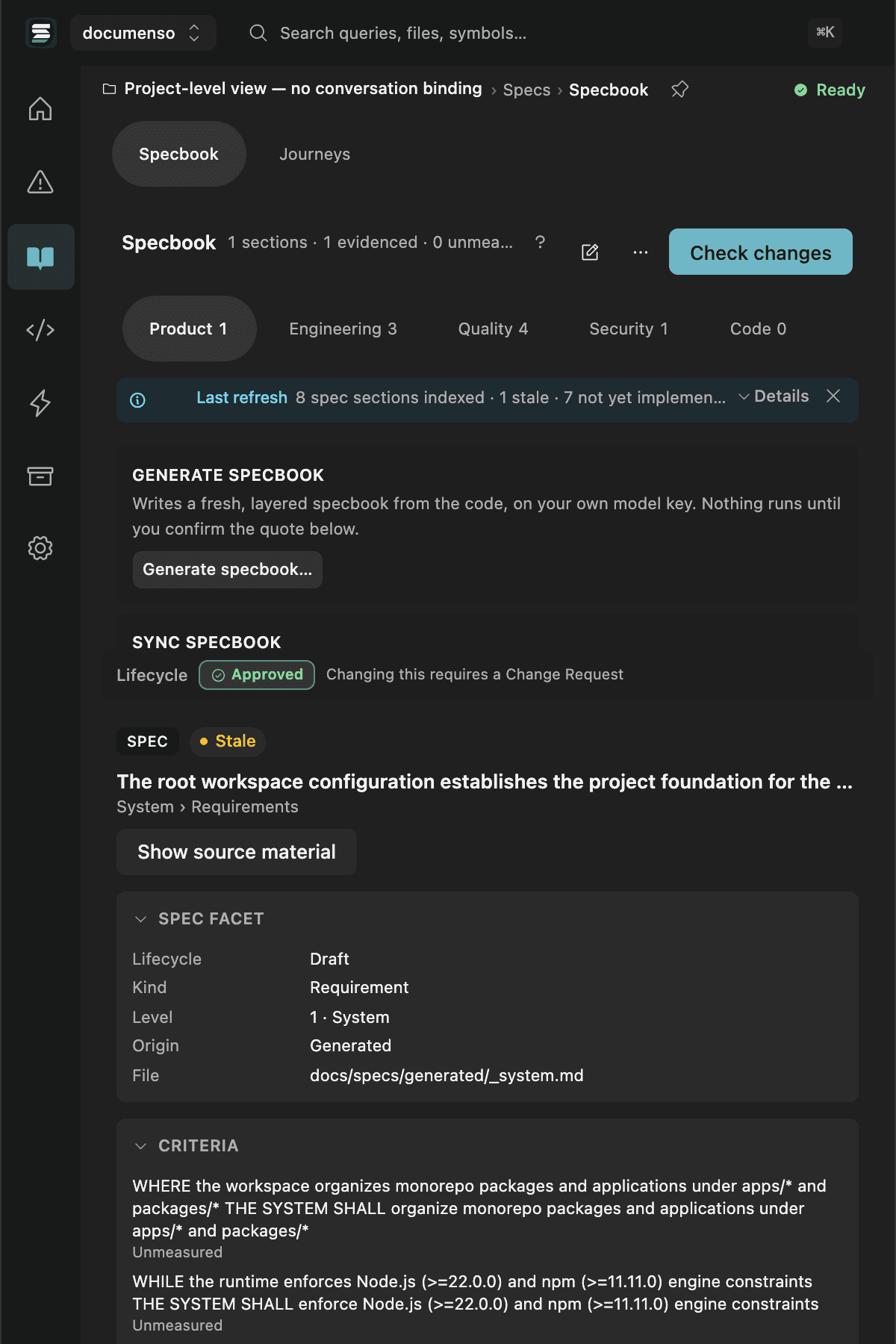
Keep its model choice, editor, terminal and permission controls. Strata19 does not replace the coding agent.
MCP tools let the agent query and update supported project records. The visual app helps you inspect those records directly.
Decide what to accept, authorize and verify. A saved specification or a completed agent task is not proof of correct behavior.
Embedded MCP apps depend on the host, version and enabled capabilities. A browser view is a separate way to inspect the project; terminal hosts can use MCP tools without rendering the visual app. Claude Desktop’s Code tab uses the Claude Code plugin; Chat and Cowork have different extension systems. A tool connection does not prove visual-pane support.
Install the plugin or MCP configuration, bind your repository and verify a real project call. Hooks require their own trust decision. Optional Strata19 model assistance has its own inference configuration; your coding-agent subscription does not automatically cover it.
Take document reminders from a customer request to implementation and review. Keep enough context for another coding session to continue the change.
“Add reminders for unsigned documents. Show me the decisions, the implementation work, and what we have checked.”
Step 1
Keep the customer note in Library and define when a reminder should be sent in Specs.
Step 2
Create work with the expected outcome and relevant source links. Your coding agent implements the change.
Step 3
Inspect the check results and unresolved work. A later session starts from that saved project state.
This example explains the workflow. A product recording is planned for this space showing the same feature in Specs, Library, Work and a recorded result.
One connected process, with people and supported coding tools contributing at each step.
Understand the problem and identify open questions.
Develop the intended behavior and the decisions behind it.
Turn changes and discoveries into actionable work.
Use your preferred supported coding tools to implement changes.
Run appropriate tests, reviews, and investigations.
Inspect results and evidence against the relevant conditions.
Review the relationship between intent and implementation as the project changes.
The product map
Code provides context, findings surface what needs attention, specs define intent, the Library keeps project knowledge, work carries it forward, and evidence shows what changed. Together, they form the environment in which the agent works.
Explore repository relationships and understand what a change might affect.
Understand a changeReview what needs attention, inspect its evidence, and decide what to do next.
Explore findingsKeep the intent behind a change close to the repository, so a later coding session can begin from project state instead of reconstructed chat memory.
Keep intent closeRecover the customer request or architecture decision behind a task without searching old conversations.
Explore project knowledgeTurn findings and decisions into durable work, keep its context, and review the evidence after changes.
Move work forwardReview a repeatable process, choose when to run it, and inspect its recorded outcome.
Explore routinesSee what was checked, what changed, and what still needs verification before deciding the work is ready.
Inspect what changedThe execution loop
Before you edit, find the relevant code. During implementation, keep the target and decisions close. Afterward, inspect the result and carry unfinished work forward.
Before the change
Start with the code, relationships, and detector results relevant to the change—not a fresh summary of the whole system.
During the change
Capture the context, intended outcome, and dependencies alongside the work so the next session can continue without rediscovery.
After the change
Run the same bounded checks again and compare the result to a checkpoint. Review what is new, still reported, or no longer reported.
Product surfaces
The MCP tools connect your coding host to local project state. Where a host supports the MCP app, the same work, specifications and sources are available in a visual project pane. Connected plans add shared project visibility when released.
Available now
Work in your harness with local project state: project context, bounded detectors, work, conversational routine drafting, checkpoints, evidence, and optional BYOK assistance through supported coding harnesses.
Upcoming
Share the project: cloud-synced history, shared visual views, Engines, and bundled plugin-agent inference through Strata Credits.
Upcoming
Run work on schedules: the planned managed-execution layer with routines, schedules, webhooks, runners, and a larger Strata Credit allowance.
Choose your coding harness, install Free Local, and start with the change you need to make today.