Know what needs attention. Understand why.
Review findings with their source and evidence, decide what matters, and turn the ones worth addressing into work.
Turn a finding into a specific next action.
Spend your attention on issues you can inspect and act on. Open the evidence, keep the follow-up, and check again after the change.
“This reminder handler may be unfinished. Show me the source and capture the follow-up if it is real.”
Step 1
Open the finding
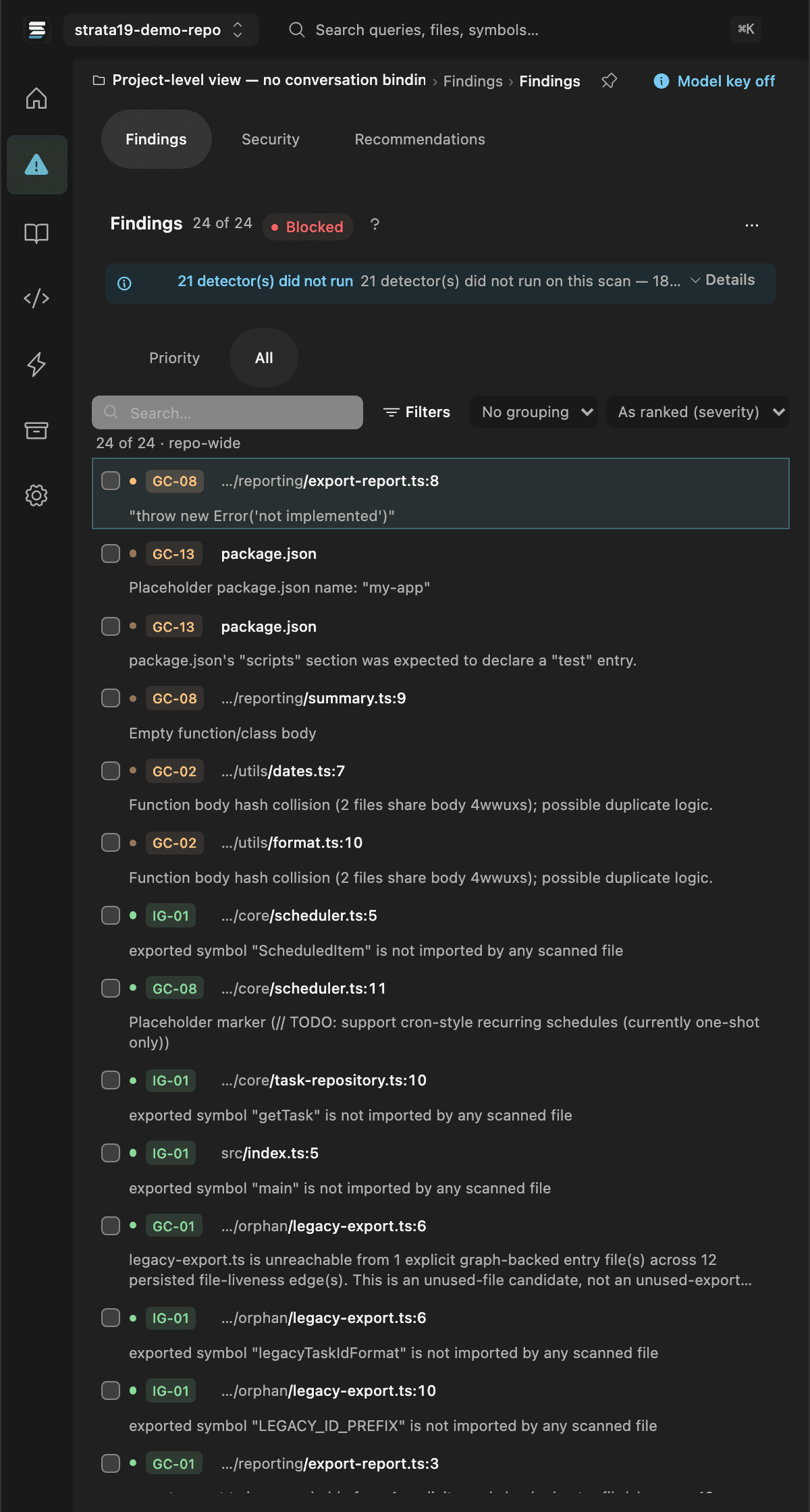
Read the affected file, line, detector and evidence. Use Priority or All to choose what to investigate.
Step 2
Capture the follow-up
Create work from the finding with its context, or hide it with a reason if it is noise.
Step 3
Check after the change
Review a fresh result and any remaining work. Disappearance from a comparison alone does not prove a repair.
About this illustration
This example explains the workflow. A product recording is planned for this space showing a finding detail, its source, capture as work and a later check.
More about triage and rechecking
From finding to follow-through.
An observation is a starting point—not a verdict. Keep the evidence visible as you decide what to do next.
Detect
A supported check surfaces a candidate issue. Findings can also come from other sources.
Review
Inspect the source, evidence, scope, and limitations before deciding what the finding means.
Act
Capture follow-up work, propose a fix, or hide noise with a reason.
Recheck
Run appropriate checks again and review what the new evidence actually shows.
Illustrative example
A detector flags a possible placeholder. Someone checks the source, creates work if it needs attention, and revisits the evidence after a change.
A finding disappearing from a comparison means it is no longer reported in that set; it does not by itself prove the repair is correct.
Checks that help you see what needs review.
Supported detectors can surface implementation gaps and other issues. What a check can find depends on its scope, prerequisites, and the available analysis.
Explore the 40 shipped checks
Detectors
40 shipped checks27 automatic checks and 13 on-request checks — all shipped in the plugin.
Finds source files that no import, route, test, or configuration entrypoint reaches.
Finds repeated code blocks across the project.
Finds unfinished code such as TODOs, empty bodies, and not-implemented errors.
Finds missing environment templates, malformed package files, and missing standard commands.
Finds catch handlers that silently discard failures instead of preserving or escalating them.
Finds an unprotected endpoint beside guarded endpoints under the same route prefix.
Finds code blocks that can never run because every path to them has already returned, thrown, broken, or continued.
Finds acquired resources, such as database connections, that are released on one path but never on another.
Finds local variable writes that nothing in the same function can ever read.
Ask the plugin to run: verify_implementation
Finds validation schemas that are declared but never applied to a request, response, or type.
Ask the plugin to run: verify_implementation
Finds when accepted project standards no longer match the configuration that established them.
Finds exported symbols that no other project source imports.
Finds files unreachable from the application entrypoints.
Finds background jobs and scheduled tasks that are defined but never registered.
Finds groups of modules that import each other in a cycle.
Finds exported code that only tests import, so no production code path can reach it.
Finds branches and statements that cannot execute.
Finds function bodies that remain duplicates even after identifiers are renamed.
Finds routes registered to handler names that do not exist.
Finds a sensitive handler without the permission check used by its siblings.
Finds production source importing testing libraries.
Finds functions that appear complete but do no meaningful work.
Finds configuration that points to a missing script, file, or environment variable.
Finds two files with the same name where one exports an empty function and the other the real one, so production can silently route to the no-op.
Finds declarations with no producer or no effect: empty functions, event triggers nothing sends, fields nothing writes, and same-named types that have drifted apart.
Finds specified endpoints or entities with no corresponding implementation.
Finds implemented entities or endpoints whose fields disagree with the specification.
Finds reachable routes missing from an already documented API namespace.
Experimental, unmeasured candidate check: lists places where request-controlled input reaches shell command execution, for you to review. Not a security verdict.
Ask the plugin to run: run_native_security_analysis
Experimental, unmeasured candidate check: lists places where request-controlled input reaches database query construction, for you to review. Not a security verdict.
Ask the plugin to run: run_native_security_analysis
Experimental, unmeasured candidate check: lists places where request-controlled input reaches server fetches or redirects, for you to review. Not a security verdict.
Ask the plugin to run: run_native_security_analysis
Experimental, unmeasured candidate check: lists places where request-controlled input reaches filesystem path use, for you to review. Not a security verdict.
Ask the plugin to run: run_native_security_analysis
Experimental, unmeasured candidate check: lists places where request-controlled input reaches HTTP response output, for you to review. Not a security verdict.
Ask the plugin to run: run_native_security_analysis
Experimental, unmeasured candidate check: lists places where request-controlled input reaches dynamic JavaScript execution, for you to review. Not a security verdict.
Ask the plugin to run: run_native_security_analysis
Experimental, unmeasured candidate check: lists places where a credential-shaped value (an API key, token or private-key header) appears in source, for you to review. It reports the pattern and location only, never the value. Not a security verdict.
Ask the plugin to run: run_native_security_analysis
Finds files that import across a layer boundary they are not allowed to cross, such as domain code reaching into the database layer.
Compares revisions for removed or changed exports and names the affected callers.
Ask the plugin to run: get_breaking_change_risk
Reports which checkable promises in a file are proven, disproven, or limited by verification coverage.
Ask the plugin to run: get_proof_certificate
Reports which checkable promises in the code have no test claiming to cover them, using proof tags in test files.
Ask the plugin to run: project_intelligence
Compares a work item’s declared scope with the files the work actually touched.
Ask the plugin to run: verify_implementation
Every listed check ships in the Strata19 plugin. Automatic checks run from their owning verification paths; on-request checks run when you invoke the corresponding analysis. Results report their own scope and coverage instead of implying that an unavailable analysis passed.
Preview: these capabilities are available now, and are not yet certified end to end across every supported host.
No check proves that every issue has been found, that a repository is secure, or that a candidate is safe to remove. Review the evidence and limitations for each result.
Connect the finding to the whole project.
Investigate the code around a finding, carry the next action into work, and check the result against appropriate evidence.